
WinzeWinze

Product

Connect. Learn. Ask. Prove.

Winze works like a superintendent, not a dashboard: continuously, in small budgeted steps. It is not a dashboard builder, and it is not an alert-rule tool.

Real screens

Every screenshot here is a real screen from a running demo tenant: simulated plant data behind the real edge, ingestion path and model gateway. Not a mockup.

01 — Connect your plant

One download. One command on site.

Point it at the OPC-UA server already on site. Download the edge bundle, run one command on a machine inside the plant, and register the server in the portal; its address space is read and the signals are catalogued and classified. Every connector is read-only, rate-limited and logged in full. Nothing inbound opens on your firewall; the edge only calls out, and each download of the edge bundle makes a single-use enrolment code.

  • OPC UA
  • AVEVA PI Web API
  • Ignition
  • MQTT · Sparkplug B
  • Modbus TCP
  • HTTP push / pull
  • S3-compatible
  • SFTP drop
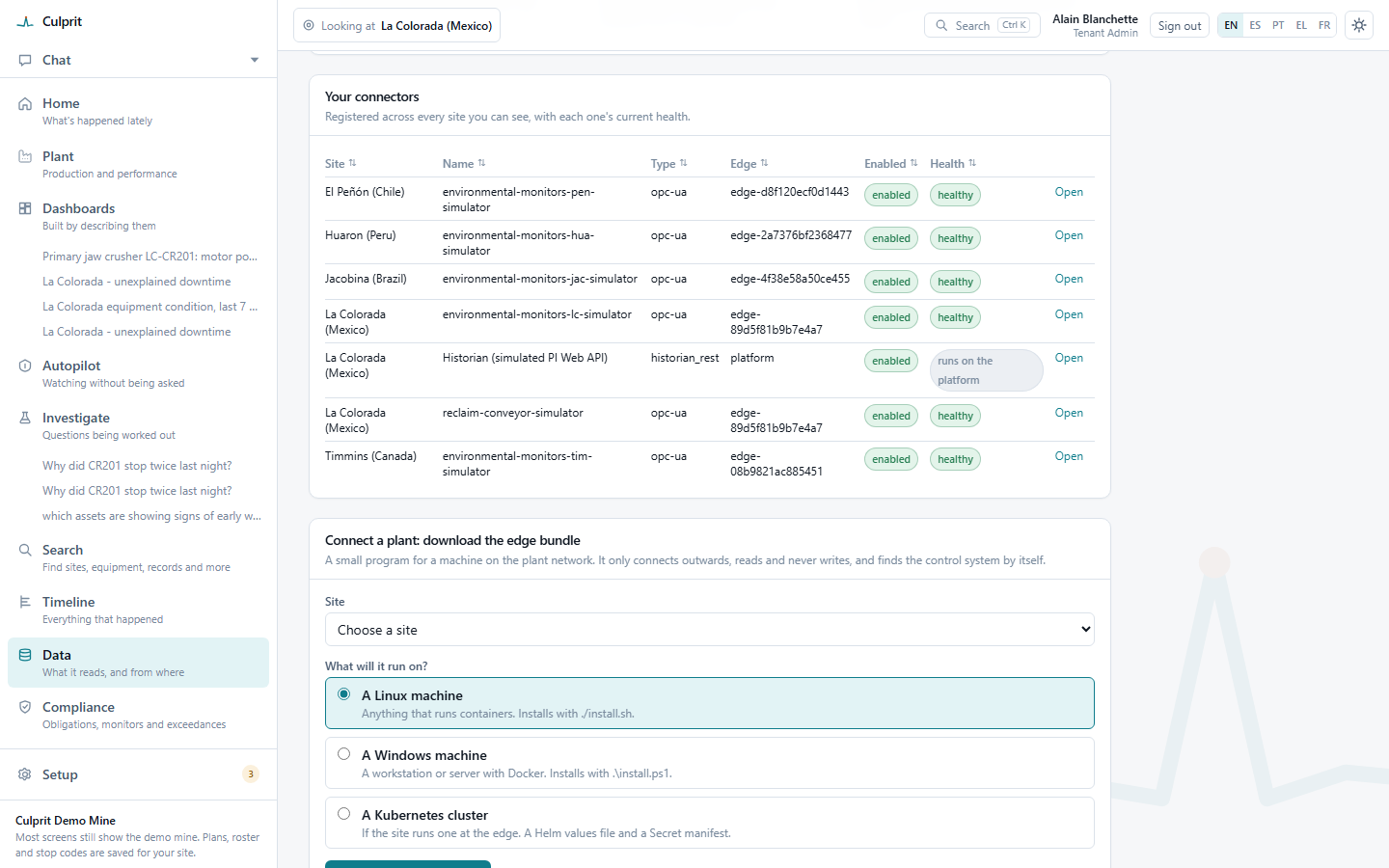
Your connectors: seven registered across five sites, each enabled, each edge connector healthy, the historian marked 'runs on the platform'

Seven ways in

Data comes in seven ways, all read-only and untrusted until a person approves.

Through the edge

  • The plant floor

    OPC UA live today; MQTT/Sparkplug, Modbus, historians and substation relays built and shown on the simulated mine

How the edge behaves

  • Outbound only, nothing inbound
  • Read-only by construction
  • Buffers at least 72 hours (seven days by default) if the link drops

Through your systems

  • Platform feeds

    Scheduled REST or read-only SQL pulls, or your system pushes rows

  • Files that arrive

    New files on SFTP or an S3-compatible bucket, mapped and checked

  • A source not yet built

    Becomes a reviewed connector spec, not a software release

Through people

  • A spreadsheet or CSV

    A model proposes what the columns mean; a person approves

  • Structured entries

    Phone forms, planned stops, shift rosters, stop codes and quotas

  • What people see and say

    A photo, a field observation or a statement, kept with who said it

One rule for all seven

Nothing is trusted until a person says so.

  1. 01

    Propose

    a model suggests

  2. 02

    Preview

    rows shown first

  3. 03

    Approve

    a named person

  4. 04

    Quarantine

    held, not dropped

Shown working on a simulated five-site mine. No connector has yet run against a customer system.

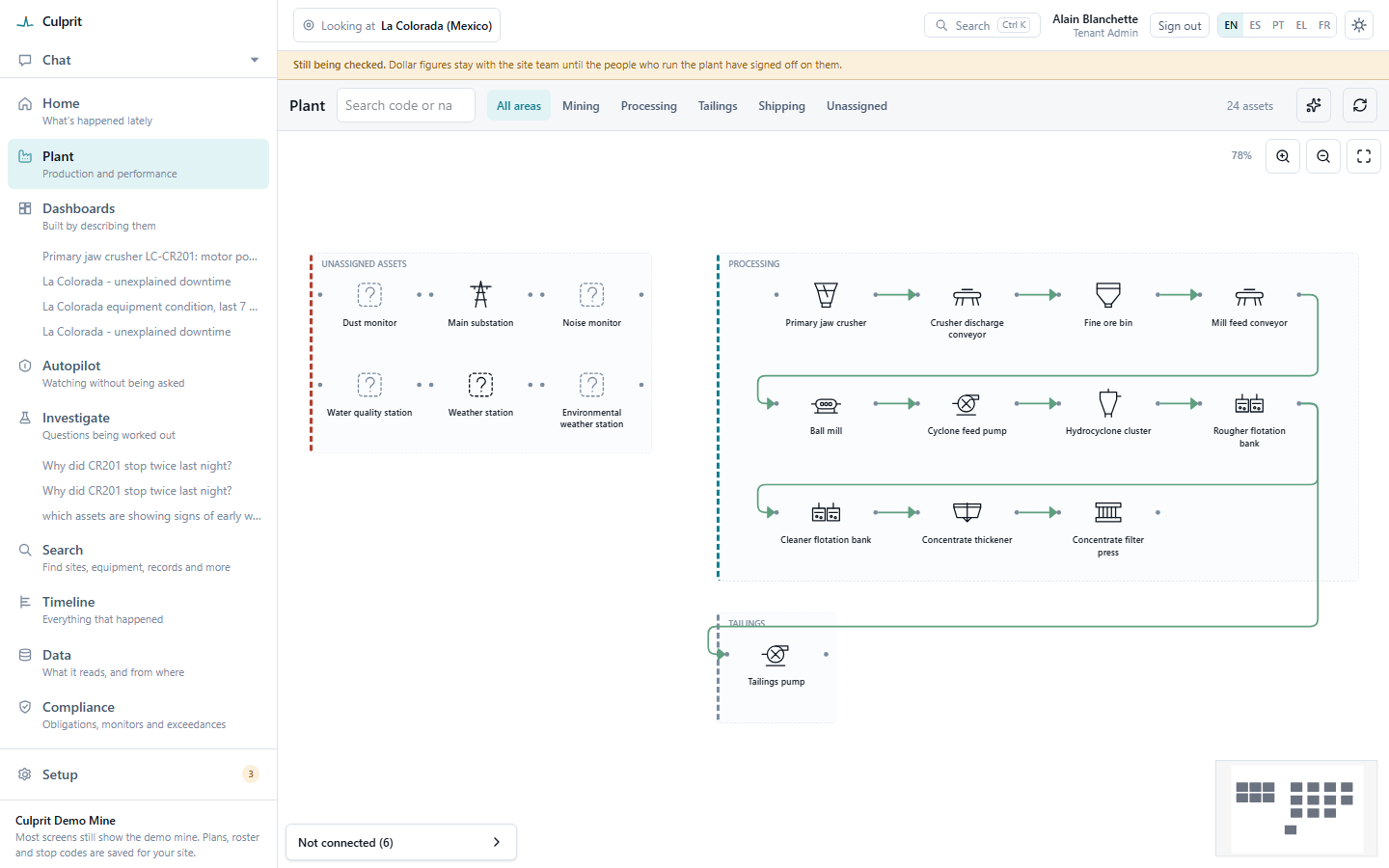
Plant: 24 assets drawn as a flowsheet, from the primary jaw crusher through grinding and flotation to the concentrate thickener and filter press, with six unassigned assets named
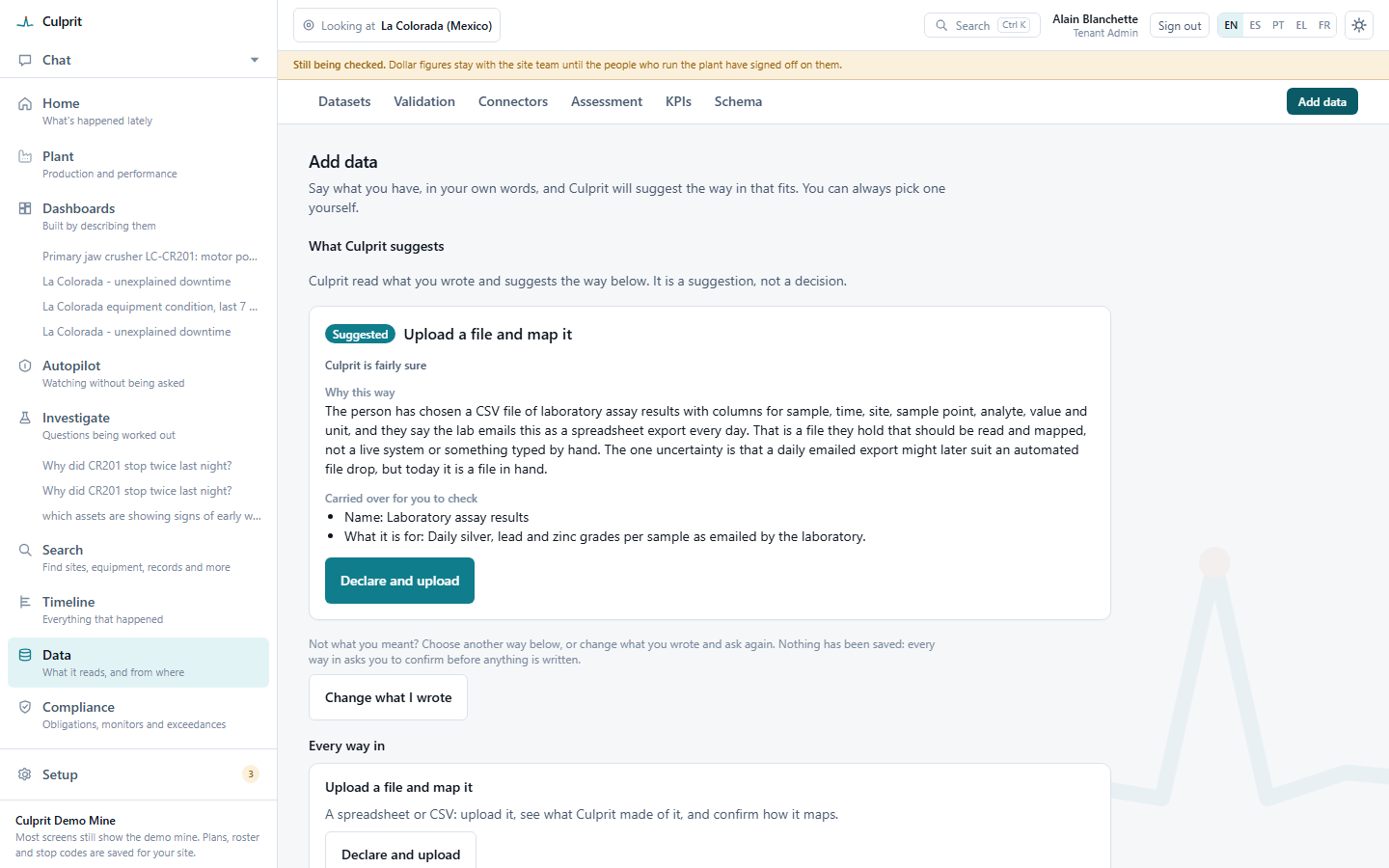
What Winze suggests: upload a file and map it, 'Winze is fairly sure', why this way, what was carried over for you to check, and Declare and upload left unpressed until a person approves

02 — Make sense of messy data

Nothing saved until a person approves it.

Say what you have in your own words: a lab spreadsheet, a daily export, a system you already run. Winze proposes a mapping, names its reason and the one uncertainty, and saves nothing until a person approves it. A figure resting on a source nobody has vouched for yet stays provisional until someone sets that source as trusted.

03 — Know your plant

What feeds what, with a confidence on every link.

Learned from how equipment starts, stops and loads, or read from the hierarchy you already keep in PI AF or Ignition instead of inferred. One tree, one focus control, from the whole company down to one asset: it only ever narrows what the screens show, never a way to see more than a role allows.

04 — Dashboards that explain themselves

A dashboard starts as a sentence.

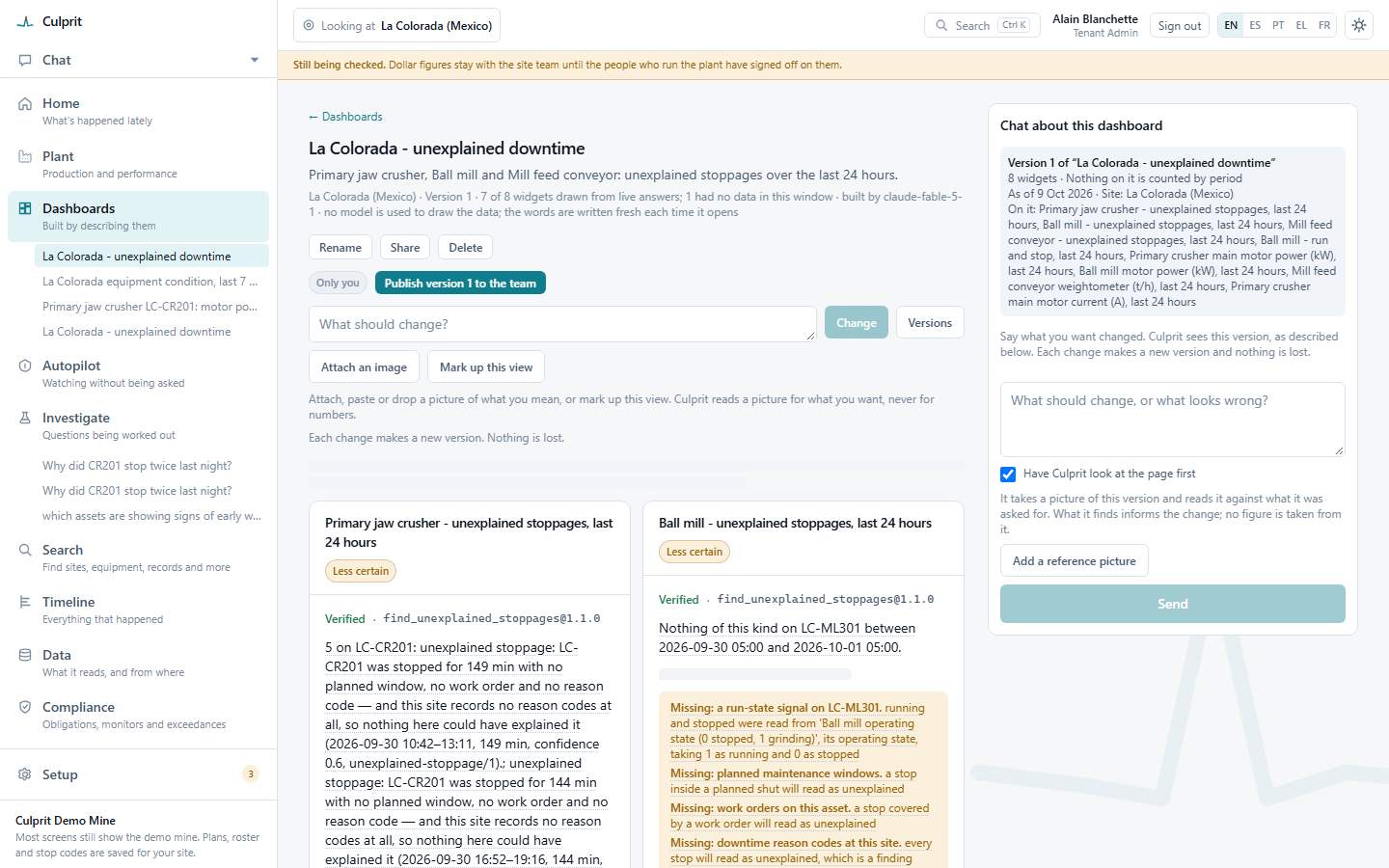
Nothing is kept unless every widget can be drawn from real data. Where a figure can’t be drawn yet, the page says what is missing: a run-state signal, a planned maintenance window, a work order, a reason code.

Unexplained downtime: the primary jaw crusher's and ball mill's unexplained stoppages, each Verified, with 'Missing: a run-state signal, planned maintenance windows, work orders, downtime reason codes' stated plainly
Unexplained stoppages, each Verified, with what is missing said plainly.
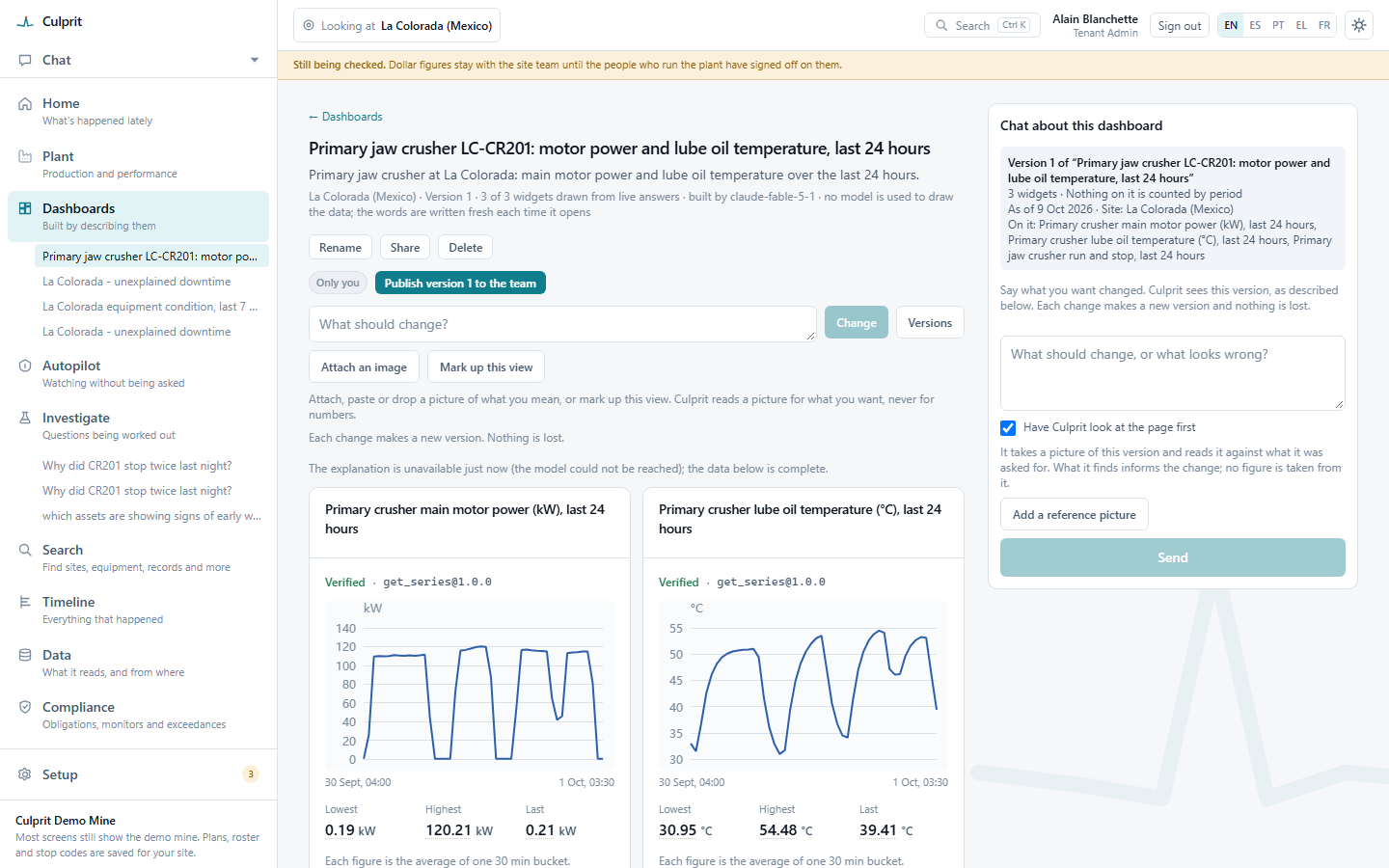
Dashboard tiles each marked Verified with the tool that answered it and an open evidence link, with the lowest, highest and last figures and the window each one covers
Every tile marked Verified, with the tool that answered it.

05 — Ask and investigate

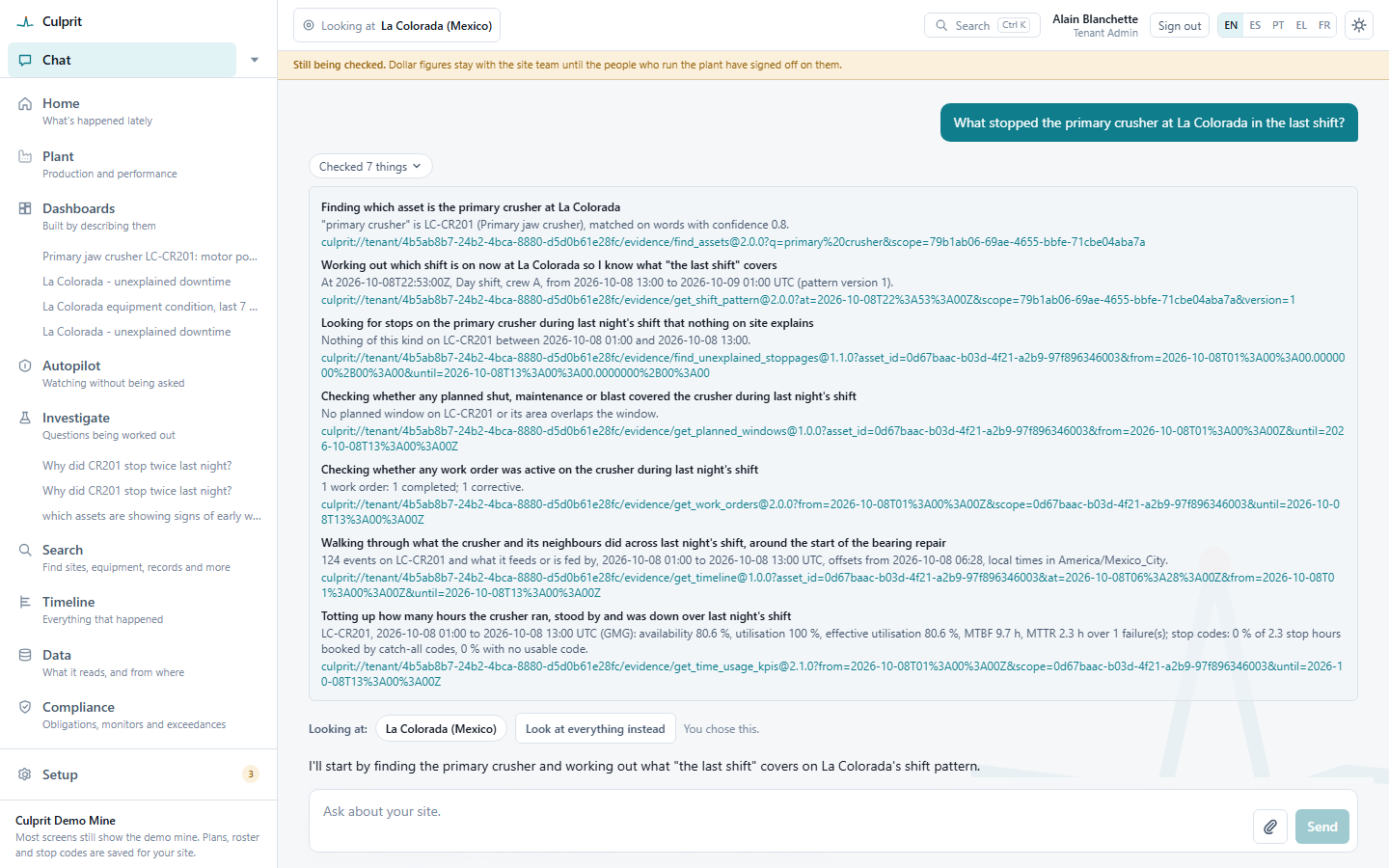
“What stopped the crusher last shift?”

Ask about your site in your own words. You see each check as Winze makes it: what it looked at, what came back, and what it tried next when a first attempt found nothing.

Same answers in any MCP client

Claude Desktop · Microsoft Copilot in M365 and Teams · Cursor · GitHub Copilot

Each with its own key that expires, rate-limits and can be revoked any time. The tools ask, Winze answers, and nothing ever writes back to the plant.

What it checked, in order: which asset matched, which shift, stops nothing explains, planned maintenance windows, work orders, a walk through the events around a repair, and availability, utilisation, mean time between failures and mean time to repair, each with an evidence link

Tools, not guesses

The AI picks a tool, the tool does the maths, and every number can be re-run.

About 350

tools the AI can call, in 12 groups

Rules every tool follows

  1. 01No model computes a numberThe model chooses and explains; the tool calculates
  2. 02Every result can be replayedAn evidence link re-runs the same calculation
  3. 03Read-only toward the plantNo tool writes to a control system
  4. 04Decisions stay with peopleConfirming a cause or a mapping is person-only
  5. 05Your role, not the AI’sYour AI client acts with your role

Twelve groups

Understand the plant
Hierarchy, scope and what feeds what
Read the data
Readings, rollups and quality scores
Analyse signals
Trends, change points and correlation
Find the loss
Unexplained stops, sensor faults, shortfalls
Price it
Losses costed with the site’s own rates
Track the KPIs
Availability, MTBF, plan and quota
Keep the records
Work orders, lab results, plans, safety
Remember
What people said, precedents and SOPs
Act on it
Recommendations, Scheduler, investigations
Check compliance
Obligations, limits and evidence packs
Present it
Dashboards and reports on request
Govern it
Roles, audit log, budgets, spend caps

About 350 tools across 23 servers, counted October 2026. The same tools serve chat, Scheduler, investigations and your own AI client. Shown on a simulated mine.

06 — Compliance

It finds the exceedance. A person decides.

Environmental monitors watched against the limits you configure: a 24-hour average over its threshold, the share of readings that were actually valid. A named person decides what it means and records how the regulator was told. Software never notifies a regulator on its own.

Environment & Compliance
Data flows one way

Read-only by design: nothing writes to your control systems.

  • Tenant isolation

    Enforced at the database; data never moves between customers.

  • Your region

    Data stays in the region you require: Australia today, more as they are built.

  • Your model provider

    You choose who runs the analysis.

Trust & security

07 — Prove it

Every number opens to the readings and method behind it.

  1. 01The figurePreliminary until the site team checks it, Verified once they do.
  2. 02The methodHours × rate: the tool and inputs that produced it.
  3. 03The readingsSignal, time, value: the raw data behind it.

The model never types a figure. Every number is a tool result you can open and re-run.

PreliminaryVerified

Known causes are split out before a dollar reaches an executive.

All lost hours

Illustrative split
  • Work orders
  • Planned stops
  • Shift logs

Known causes, split out first: maintenance’s issues aren’t sold as discoveries

Unexplained

The real finding: what reaches the GM

Under the hood

Specialist agents do the analysis. Every conclusion is checked.

Every investigation is recorded (hypothesis, method, data, result) and a memory recalls earlier runs and incidents, so ground is never covered twice.

Orchestrator

Reads the question, plans the work, assigns it

  • Data analystsignals
  • Device expertinstruments
  • Asset analystasset history
  • Reliability engineerfailures
  • Domain analystsite context

Verification

Checks every conclusion independently before you see it

Kept, not disposable

  • The method is kept

    Every investigation is recorded: hypothesis, method, data, result

  • Earlier runs feed the next

    Runs and incidents are recalled, not redone

  • Reusable templates (planned)

    Promoting a good run into a template

Tools at its disposal — budgeted, with a time limit and a recorded cost on every run

Statistics
Mean, median, spread, distribution comparison, operating-state clustering
Correlation
Pearson, with lag detection
Anomalies
Robust outliers, change points, learned baselines
Context
Signal queries, plant-graph and ontology traversal

Swap the model

Swap the model, keep the tools, memory and skills built around it.

Tools

Query, analyse, report, notify, configure. New MCPs plugged in at any time.

Grows with every integration

Memory and history

Investigations, outcomes and decisions, retained and reused across sites.

Compounds with every job

Prompts and skills

Your engineers’ diagnostic playbooks, encoded, versioned and improved over time.

Tuned without touching the model

Same stack, better model

Run the same tools, memory and skills on a newer model and the answers improve with it. No rebuild required.

The model

LLM, swappable

  1. 01Analysebreak down the problem
  2. 02Exploreconsider options and trade-offs
  3. 03Evaluateweigh pros and cons
  4. 04Reasonsynthesise insights

Scheduler

Runs on a schedule. Shows its reasoning.

Set a task, such as “check secondary circuit losses”, and it runs on schedule in the same small budgeted steps, as often as every shift. Every run shows its reasoning, the charts it drew, the tools it used, and who it told.

  • Capped
  • Budgeted
  • Auditable

Self-service

From sign-up to connected plant, with nobody from Winze involved.

Winze staff needed

None

  1. Step 1

    Sign up

    Self-service, no sales call.

  2. Step 2

    First answer

    On a demo mine, before you connect anything.

  3. Step 3

    Upload a file

    Try it on your own data.

  4. Step 4

    Install the edge connector

    One command on site, then register the source in the portal.

No site visit, no setup project, no Winze engineer.

Built versus roadmap

What is live today, and what comes next.

Live today on OPC-UA; historians, maintenance and fleet come next.

Live today · OPC-UA first

  • Connect OPC-UA, discovery, signal classification
  • Plant view, flow graph, asset ontology
  • Chat with traceable figures, charts, shift reports
  • Dashboards generated from intent
  • Scheduler tasks with reasoning trace
  • Tenant isolation, read-only, self-service sign-up and billing

Next · not yet shipped

  • P1Historians and the retrospective
  • P2Maintenance-system attribution
  • P2Safe optimisation
  • P3Fleet systems
  • P4Power and IEC 61850
  • LaterPer-site cost allocation, hierarchical tenants

Next step: a pilot on one site.

See it on your own plant. Book a pilot and we’ll run it with you on one site: the unexplained loss on your plant, priced, with its evidence.

  1. 01

    Connect one site

    OPC-UA, read-only, one command on site

  2. 02

    Run it for 90 days

    Chat, shift reports and Scheduler tasks

  3. 03

    Review the findings together

    The unexplained loss, priced, with its evidence

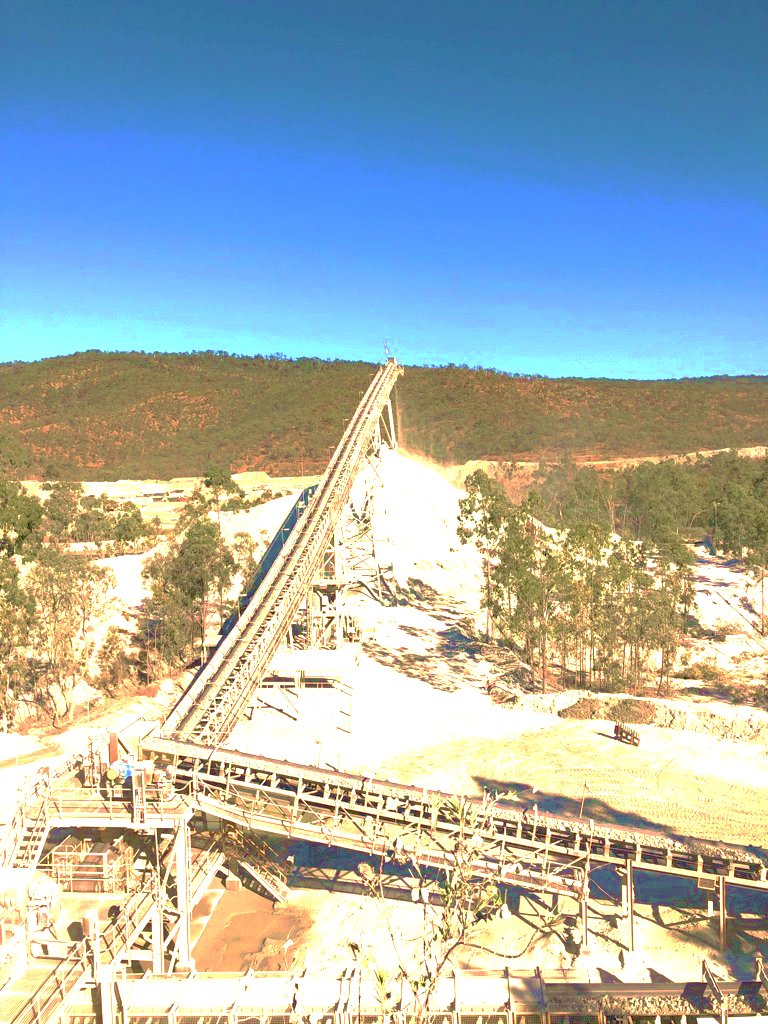
A conveyor running up from a processing plant at a mine site